IP Camera Viewer
- 3.8
- Rating
- 1.00M
- Installs
- Free
- Price

 Analysis by App-foxy
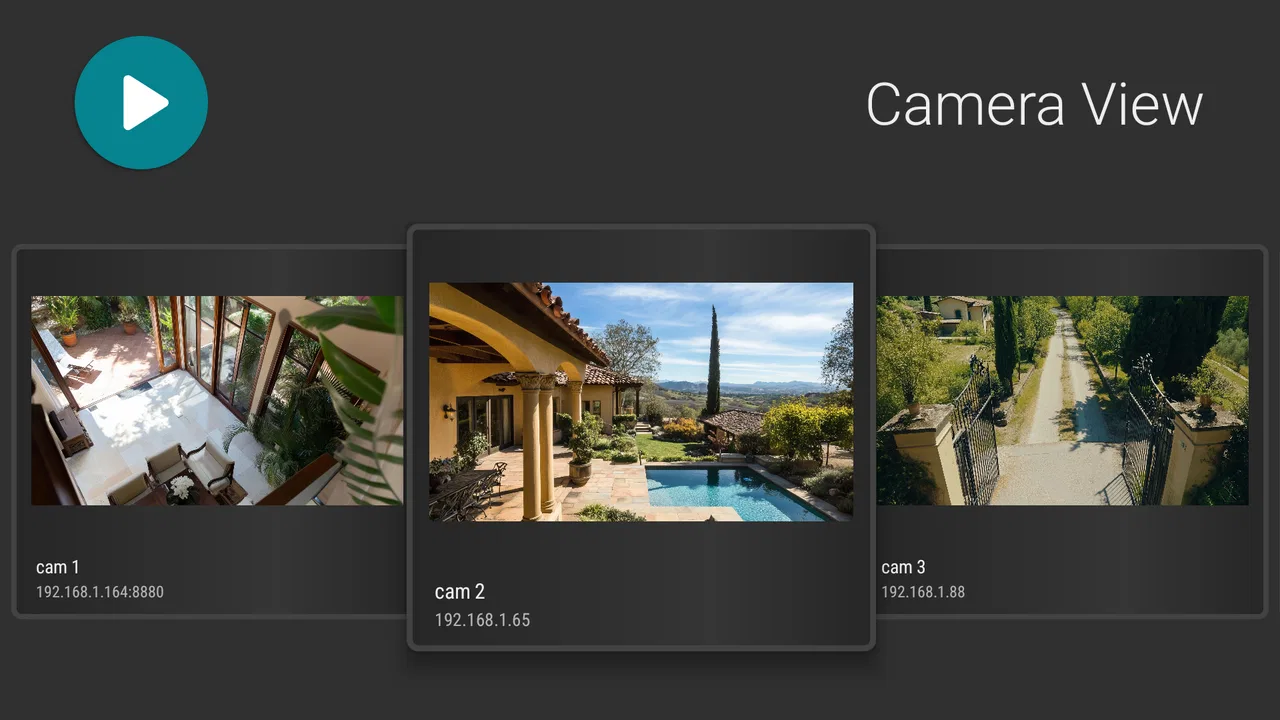
Watching a home camera from a phone sounds simple until the usual camera app becomes slow, awkward, or limited to one brand of hardware. IP Camera Viewer takes a more practical route: it is an Android app for viewing an IP camera and checking recorded playback, including cameras used in WiFi setups and home security CCTV systems. I found its appeal strongest when I treated it as a viewing tool rather than a complete smart-home platform.
That distinction matters. This is not the sort of app I would choose because I want a polished ecosystem, a cloud subscription, or a long list of connected-home extras. I would choose it when I already have a compatible camera arrangement and want a straightforward way to look at the feed or revisit footage. The app is free to install, aimed at Everyone, and comes from kapron-ap. Its current version is 10.6.7, while the Android requirement starts at version 5.0, so it remains accessible to a broad range of phones.
After spending time with it, my overall impression is mixed in a useful way. It can be a sensible, low-cost companion for an existing WiFi camera or CCTV setup, but the experience depends heavily on the camera itself, the network, and how much control you expect from a mobile viewer. If your priority is simply getting a live picture and playback in one place, it has a clear purpose. If you expect the refinement of a camera manufacturer’s own app, you may notice its rough edges quickly.
You May Also Like

 Blood Strike: 2.5 Anniversary
Blood Strike’s Loadouts Turn Every Drop Into a Tactical Gamble
A close look at Blood Strike’s custom loadouts: how fast access to signature weapons reshapes its battle royale rhythm, rewards preparation, and narrows the gap between fights.

 Pandora - Music & Podcasts
Pandora’s Music Is Easy to Start, but Harder to Recover
Pandora’s strength is its low-effort path from a seed to a station. Its weak spot is how much confidence it asks you to place in connection, setup, and quiet recovery.

 8 Ball Pool
 Is Built on Rivalries, Rematches, and Routine
A close look at the rivalries, rematches, shared routines, and unanswered safety questions that turn a quick pool match into a persistent mobile community.

 Samsung Music
’s Quiet Strength Is Playing What You Already Own
Its reach comes less from spectacle than from dependable access to a personal library. That simplicity is both the app’s strongest retention engine and its ceiling.

 AccuWeather: Weather Radar
AccuWeather Review: A Quick, Clear Forecast for Everyday Decisions
For everyday plans, the best forecast is the one you can understand quickly. AccuWeather makes rain timing, radar, and local conditions easy to act on, with a few trade-offs.

 Hill Climb Racing
Why Hill Climb Racing Still Turns Crashes Into One More Run
A tiny car, a bumpy hill and one more upgrade: Hill Climb Racing keeps resurfacing because its simple chaos makes every near-miss feel personal.
More From Our News Desk
View All News


How the app feels during everyday camera checks
I find the most useful way to judge a camera viewer is to begin with an ordinary check, not a perfect network test: open the feed when you need to see whether a room or entrance is as expected, then notice where the process feels uncertain. That everyday routine also raises a more important question—what can I actually verify about trust and control before relying on a camera app?
Speed depends on the whole connection, not just the app
The first thing I would tell a friend is not to judge the app’s speed in isolation. A camera viewer sits between the phone, the local WiFi network, the camera, and sometimes the wider internet. A delay when opening a feed can come from any of those points. That makes the app feel fastest in a stable home network, especially when the camera is nearby and the phone is not struggling with a crowded connection.
For a quick check, the workflow is naturally lighter than leaving a camera feed open for hours. I could imagine opening it to see whether a front door is clear, checking a room while away from home, or reviewing a moment after hearing an unexpected noise. Those short sessions are where a viewer like this makes the most sense: open the app, inspect the picture, move on.
Playback changes the expectation. Live video is about immediacy, while recorded footage requires the app and camera system to locate and deliver an earlier segment. I would not assume that a tap on a timeline will feel as immediate as switching between ordinary phone videos. The practical tip is to identify the important recording window before you need it. If you are investigating a delivery or checking what happened during a particular period, knowing roughly when to look saves more time than repeatedly scrubbing through a long recording.
The useful performance habit is to separate network delay from app delay. If the same camera is also slow in its manufacturer app or through another viewing method, the problem is probably outside this viewer. If the camera responds normally elsewhere but feels unusually sluggish here, then the app becomes the more likely source of friction. That simple comparison prevents a lot of unnecessary troubleshooting.
What happens when the phone and camera are under pressure
Heavy use is not only about having many cameras. It can also mean keeping a live feed open while moving between apps, checking playback repeatedly, or using the phone for other demanding tasks. In those moments, I would expect the experience to become less predictable than during a single short viewing session. Video is continuously receiving and displaying data, so an older phone or an unstable connection has less room for error than a basic text or household app.
I would use it differently depending on the job. For a quick visual confirmation, I would open one feed, check what I need, and close it. For monitoring a situation over a long period, I would avoid assuming that the phone is the ideal display. A dedicated monitor, the camera’s own viewing solution, or a more specialized surveillance system may be better suited to continuous observation. That is not a criticism unique to this app; it is a sensible trade-off when a phone is being asked to act like a security console.
Repeated playback searches are another realistic stress point. If you are trying to find a small event in a large amount of footage, the limiting factor may be the camera’s recording method rather than the viewer. I found it more sensible to use a narrow time range and confirm the camera clock first. A clock that is off by several minutes can make an otherwise good playback search feel broken, because you keep looking in the wrong place.
There is also a practical battery consideration. I would not leave a live camera view running in my pocket all day unless I had a good reason. Any video viewer can keep the screen, network connection, or both active for longer than normal phone use. For occasional checks, that is unlikely to matter much. For constant viewing, it becomes part of the ownership cost even though the app itself is free.
Stability and recovering from interruptions
A camera app earns trust less by never encountering a problem than by recovering sensibly when something changes. WiFi drops, a phone moves between networks, the camera restarts, or the user locks the screen. With a viewer designed around network cameras, those interruptions are part of real use rather than rare exceptions.
My advice is to treat a failed feed as a diagnosis step, not an immediate reason to delete the app. First check whether the phone is still on the expected network. Then see whether the camera itself is powered and reachable. If the phone has recently switched from home WiFi to mobile data, the same camera may no longer be reachable in the way it was a moment earlier. Restarting the viewing attempt after restoring the correct connection is often more useful than repeatedly tapping the same control.
Playback deserves the same patience. A live image returning does not automatically mean that older footage will be available in the same way. The camera may need its storage, recording service, or network path to be functioning correctly. I would test both live viewing and playback during setup, not wait until an incident makes the difference important. That small check is one of the most valuable workflows for anyone relying on the app for home awareness.
I also recommend keeping expectations realistic after an interruption. A phone viewer is not a substitute for a dedicated recorder. If your household depends on uninterrupted evidence capture, the camera and recording hardware remain the critical parts of the system. This app can help you see and review what the system has available, but it cannot make an unavailable recording appear or repair a camera that has lost power.
Older Android phones and practical device limits
The minimum requirement of Android 5.0 makes the app approachable for older devices, which is useful if you want to reuse a spare phone as a camera monitor. Still, an operating-system requirement is only the starting point. The age of the phone, its memory, screen, battery condition, and network hardware all shape the experience.
An older phone may be perfectly adequate for opening a feed briefly but less comfortable for extended playback or repeated switching. A small screen can make detailed scenes harder to inspect, while a weak battery can turn long monitoring sessions into an inconvenient routine. I would use a spare device for occasional checks only after confirming that it remains responsive with the camera view open.
There is a trade-off in choosing an old phone for this job. It costs nothing extra if the device is already available, but it may not handle interruptions as gracefully as a newer phone. A newer device is more likely to feel comfortable during playback and multitasking, although the app’s usefulness still depends on camera compatibility and network quality. In other words, upgrading the phone is not a guaranteed fix for every viewing problem.
The broad age rating also makes the app easy to consider for a household, but I would still be careful about who can access the camera setup. A family member using the app should understand which camera they are viewing and when. The important protection is not the age label; it is sensible control of the phone, the camera account, and the home network.
Where it fits beside manufacturer apps and CCTV tools
The usual alternative is the app supplied by the camera maker. That option often has an obvious advantage: it is built around one hardware family, so setup instructions and supported functions are usually easier to understand. If you need every device-specific control, alerts, cloud features, or camera settings in one place, the manufacturer’s app may be the safer choice.
IP Camera Viewer becomes more interesting when you do not want to be tied so closely to one brand or when your main need is viewing and playback. Its focused purpose can be an advantage because you are not necessarily navigating a large smart-home dashboard just to see a camera. At the same time, a broader viewer can require more personal testing before you know how well a particular camera behaves with it.
Dedicated CCTV software is another comparison point. A surveillance-oriented system is usually preferable for several cameras, long monitoring sessions, and structured investigation of recorded footage. It may offer a more suitable layout and better tools for an operator who spends a large part of the day watching feeds. For a person who checks one home camera occasionally, that extra complexity may be unnecessary.
My practical rule is simple: choose this app when viewing is the center of the task; choose the manufacturer’s app when hardware-specific control matters; choose a dedicated CCTV solution when monitoring and investigation are central activities. That division is more useful than declaring one option universally best.
Small workflows that make the experience better
One useful workflow is to test the app in the exact places where you plan to use it. Check the camera while standing near the router, then from the room where you usually carry the phone, and finally from outside the home if remote viewing is part of your plan. This separates a camera problem from a weak signal area and gives you a more honest idea of everyday speed.
A second is to create a routine for playback rather than searching randomly. Note the approximate time of an event, verify whether the camera clock matches your phone, and inspect a short window around that moment. This is especially helpful for deliveries, pets, visitors, or checking whether a door was left open. The app’s playback capability is more valuable when you approach it like an organized review rather than a casual scroll.
A third is to keep a fallback method available during setup. I would not remove the camera maker’s app until I had confirmed that live viewing and playback both work reliably here. Having the original app available gives you a reference point when diagnosing a connection problem and prevents you from being locked out of your own camera while experimenting.
A fourth is to decide whether the free model covers your actual routine before considering optional purchases. The app is free, while in-app purchases range from $1.99 to $15.99 per item. I would avoid paying simply because a feature sounds useful in theory. First establish whether the basic viewing workflow fits your cameras, then decide whether an optional purchase solves a real limitation for you.
Who should use it, and who should look elsewhere
I can recommend it to someone who already owns a WiFi camera or home CCTV setup and wants a phone-based way to view the feed and revisit footage. It is also worth considering for a spare Android phone, occasional home checks, or a mixed setup where a simple viewer is more convenient than opening a full smart-home application.
I would be more cautious if your priority is guaranteed compatibility with one specific camera model, advanced camera controls, constant professional monitoring, or a highly polished setup process. In those situations, the manufacturer’s application or dedicated surveillance software is likely to offer a clearer fit. The same applies if you dislike troubleshooting network connections; a general viewer can be less forgiving than a tightly integrated camera system.
The app’s audience is broad enough to explain its popularity: it has passed one million installs and holds a 3.7 average from around 7.6 thousand ratings. I read those figures as a sign of practical interest rather than proof that every setup will be smooth. People use many different cameras, routers, phones, and recording arrangements, so individual results can vary considerably.
My performance verdict after weighing the trade-offs
For speed, I see it as a quick-check tool first. It should feel most comfortable when the camera and phone share a healthy network, while delays during remote access or playback may reflect the wider system. For resource demands, short sessions are the sensible use case; continuous viewing can place more pressure on the phone’s battery and responsiveness.
For reliability, the strongest approach is preparation. Test live viewing and playback before you depend on them, learn how your camera behaves after a network interruption, and keep the manufacturer’s app available until the setup proves itself. These steps do more to improve confidence than simply installing the newest app version.
My final recommendation is to try it when you need a focused camera viewer, not when you need a complete security platform. Its free entry point makes experimentation easy, and the Android 5.0 minimum keeps it accessible to older phones. The developer, kapron-ap, has positioned the app around a clear everyday need, and that clarity is its main strength.
At the same time, I would not treat it as a replacement for dependable camera hardware, a strong network, or dedicated recording equipment. If those foundations are sound, the app can be a convenient window into your home system. If they are not, no viewer can fully compensate. For my own recommendation, that makes it a reasonable first try for casual and household monitoring, with the honest warning that demanding users may be happier with a camera-specific or professional CCTV alternative.
FAQs for IP Camera Viewer
01What devices are compatible with IP Camera Viewer?
IP Camera Viewer is compatible with a wide range of devices, including most Android and iOS smartphones and tablets. It supports a variety of IP camera brands and models, allowing for flexible use across different setups. Make sure your device meets the app's minimum OS requirements for optimal performance.
02How many cameras can I connect to the IP Camera Viewer app?
The IP Camera Viewer app allows you to connect and monitor multiple cameras simultaneously. The exact number of supported cameras can vary depending on your device's processing capabilities, but typically, users can connect up to 10 cameras for a comprehensive surveillance setup.
03Is the IP Camera Viewer app secure to use?
Yes, IP Camera Viewer prioritizes user security by employing encrypted connections and secure protocols to transmit data. It’s crucial to ensure that your cameras and network are also secure by using strong passwords and updated firmware to prevent unauthorized access.
04Can I view my cameras remotely with IP Camera Viewer?
Absolutely, IP Camera Viewer supports remote access, allowing you to view your cameras from anywhere with an internet connection. You’ll need to configure your cameras and network settings properly to enable remote viewing, which is detailed in the app’s comprehensive user guide.
05Does IP Camera Viewer offer motion detection alerts?
Yes, IP Camera Viewer includes motion detection features, sending alerts directly to your device when motion is detected. This feature can be customized to fit your needs, including sensitivity adjustments and specific area monitoring, ensuring you only receive relevant notifications.
Pros
- Easy setup and installation process.
- Supports multiple camera brands.
- Remote access from anywhere.
- User-friendly interface design.
- Real-time alerts and notifications.
Cons
- Limited free features available.
- Occasional connectivity issues.
- Requires stable internet connection.
- Some advanced features are paid.
- Interface can be cluttered at times.

IP Camera Viewer
Gallery